How to debug a BAF deployment
While deploying a DLT/Blockchain network using BAF, the pods and other components take some time to start. The BAF automation (Ansible component) waits for the components to be at a “Running” or “Completed” state before proceeding with further steps. This is where you can see the message “FAILED - RETRYING: … “
Each component has a retry count which can be configured in the configuration file (network.yaml). When everything is fine, the components are usually up in 10-15 retries. Meanwhile, you can check the components while the retries occurs to avoid unnecessary wait time till the error/Failed message occurs in Ansible logs.
BAF Deployment Flowchart
This flow chart shows the BAF Deployment process flow. To verify the steps of deployment, follow the flow chart and check verification table ‘C’ to troubleshoot the general errors.
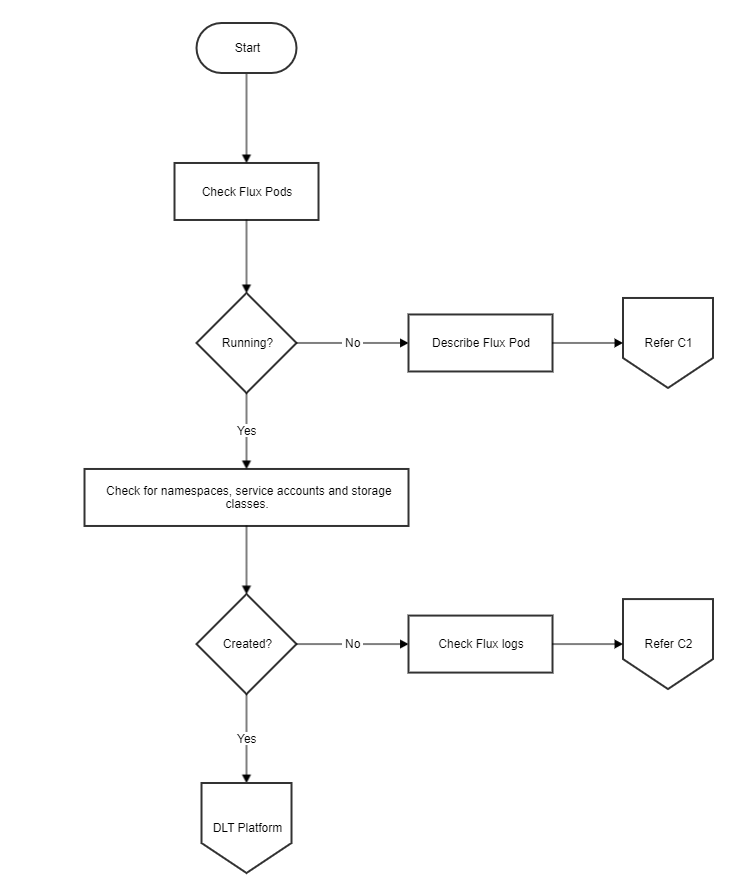
Common Troubleshooting
Table ‘C’
| Section | Sub-section | Problem | Possible Cause | Solution |
|---|---|---|---|---|
| C1 | a | Unable to mount config-map git-auth-{{ network.env.type }} | Gitops key file path is wrong or file is unreadable by Ansible controller | Check the gitops.private_key in network.yaml value is an absolute path, and the file is readable by the Ansible controller. Update this for all organizations and re-run the playbook after reset. |
| C2 | a | Unable to clone repository | Correct permissions have not been given to the gitops public key | Check that the public key corresponding to the gitops.private_key has been added to the Git repo with read-write permissions. As mentioned here |
| C2 | b | Unable to clone repository | git_shh value is wrong | The gitops.git_ssh should be the SSH clone address of the git repository. For example for GitHub it will be like "ssh://git@github.com/ |
| C2 | c | Unable to clone repository | SSH is blocked from Kubernetes | Check that you can clone the git repo using ssh from another pod on the same Kubernetes cluster. If not, check your organization security groups to allow port 22 access outbound |
| C2 | d | No such file or directory | Files are not getting committed to the git repo from Ansible controller | Check gitops section of each organization for possible mistakes in branch, password/token, git_push_url etc |
| C2 | e | No such file or directory | Files are not getting committed to the git repo from Ansible Controller | Check whether git branch is right. Ansible playbook should be run from the same branch as specified in network.yaml in gitops section Check the Ansible logs to see if your local repo is in sync with the remote Check whether the git password/token is valid |
| C2 | f | The storageclass \" |
The storageclass template is wrong and not according to Kubernetes defined rules | Check that the new StorageClass template that you have added is valid by manually creating a storage class using the same template. (This error will occur only if you have added or changed the Storageclass template). Refer to BAF Operations Guide on how to add a new storage class template |
| C2 | g | Retries exhausted while waiting for service account to come up | If the flux pod is in crashloopbackoff, and flux pod log mentions "extracting public key: Load key \"/etc/fluxd/ssh/identity\": invalid format\r\n" | Re-create the public/private key for gitops, add the gitops private key path to the network.yaml, add the public key to the repository, reset the network and run again. To reset the network ansible-playbook platforms/shared/configurations/site.yaml -e "" -e "reset=true" |
NOTE:
If the components are not able to connect to each other, there could be some issue with load balancer. Check the haproxy or external DNS logs for more debugging. Also verify the security groups for any possible conflicts.
If any pod/component of the network is not running (in crashloopbackoff or in error state) or is absent in the get pods list.
Check the flux logs if it has been deployed or not. Check the helm release. Check the status as well as if the key-values are generated properly. For further debugging check for pod/container logs. If components are there but not able to talk to each, check whether the ambasssador/ haproxy is working properly, urls are properly mapped and ports are opened for communication or not.
Hyperledger Fabric Checks
The flow chart shows the Fabric Deployment process. To verify the steps of deployment, follow the verification Table ‘F’, to troubleshoot the general errors.
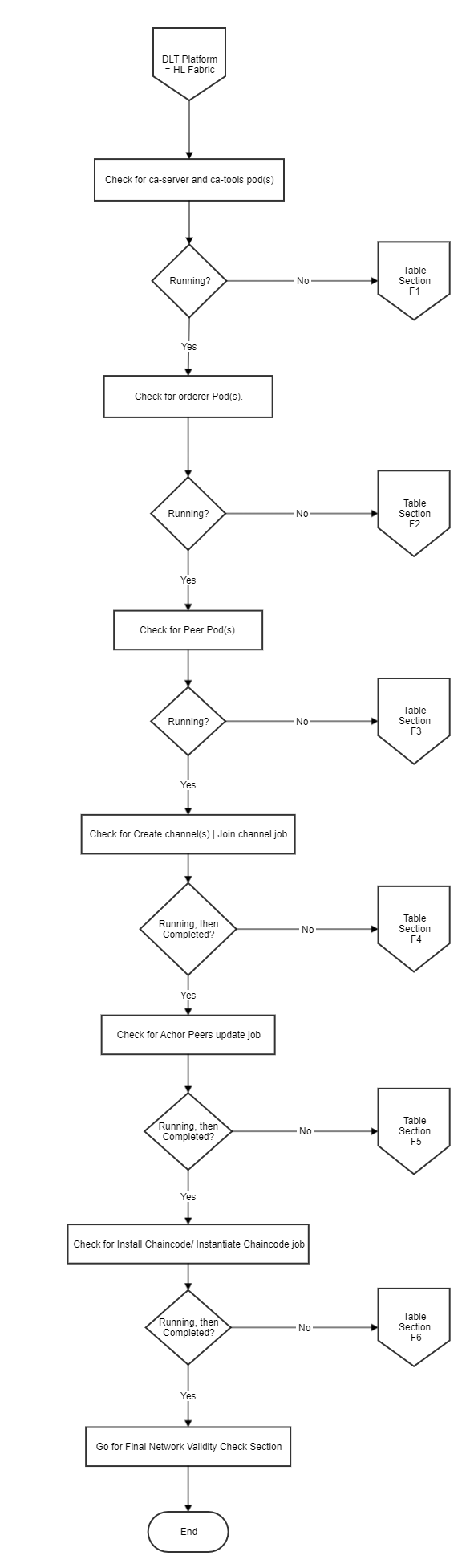
Fabric Troubleshooting
Table ‘F’
| Section | Sub-section | Problem | Possible Cause | Solution |
|---|---|---|---|---|
| F1 | a | Ansible playbook failed after exhausting retry counts or ca pod is in Init:Crashloopbackoff state Playbook execution terminated at Role: create/ca-tools Task: Waiting for the CA server to be created in Error: Retries exhausted |
Issues with Vault connectivity | If the pod ca-kubectl logs ca-<random_suffix> -c certificates-init -n <ORG_NAME>-net |
| F1 | b | Ansible playbook failed after exhausting retry counts or ca pod is in Init:Crashloopbackoff state Playbook execution terminated at Role: create/ca-tools Task: Waiting for the CA server to be created in Error: Retries exhausted |
Issue with Vault authentication | If the logs mention "access denied", make sure that the Vault authentications were created correctly by checking all the tabs on Vault UI. Any Vault authentication problem is because of running different configurations (network.yaml) on the same Vault. Please ensure that you reset the network before re-running with a different network.yaml. |
| F1 | c | Ansible playbook failed after exhausting retry counts Playbook execution terminated at Role: create/ca_tools Task: Waiting for pod ca in Error: Retry count exhausted |
Storage class is incorrect | Check the description of the pod ca-kubectl describe pod ca-<random_suffix> -n <ORG_NAME>-net If the events (at the end of description says) "pod has unbound immediate PersistentVolumeClaims (repeated n times)" then this can possibly check a. If you haven't modified any storage class templates, then check network.organization.cloud_provider for incorrect cloud provider b. If you have modified storage class, please make sure that the storage class works with the mentioned cloud provider under network.organization.cloud_provider |
| F2 | a | Orderer(s) pods aren't deployed Ansible playbook failed at Role: create/crypto/peer Task: Copy tls ca.crt from auto generated path to given path Error: Msg: Destination directory |
Orderer TLS certificate path errors or inconsistency with the orderer definitions in the orderer section and the orderer organizations | Ensure the path network.orderer.certificate is an accessible (read and write) by the Ansible controller and is an absolute path. |
| F2 | b | Orderer(s) pods aren't deployed Ansible playbook failed at Role: create/crypto/peer Task: Copy tls ca.crt from auto generated path to given path Error: Msg: Destination directory |
Orderer TLS certificate path errors or inconsistency with the orderer definitions in the orderer section and the orderer organizations | This also occur only when the orderer section under the organization with type as orderer and the orderer section under network.orderers are inconsistent. Check network.yaml and reset and re-run after fixing the inconsistency. |
| F2 | c | Orderer(s) pods aren't deployed Playbook executed terminated at Role: create/crypto/peer Task: Create ambassador credentials Error: "error: Cannot read file ./build/crypto-config/peerOrganizations/ |
When having multi peers, the naming convention is incorrect | This error usually comes when the peers aren't named in sequential order. BAF currently supports peer naming in sequential order. So if there are 3 peers, they should always be named as peer0, peer1 and peer2. Check network.yaml and reset and re-run after fixing the inconsistency. |
| F2 | d | Ansible playbook failed after exhausting retry counts or orderer pod is in Init:Crashloopbackoff state Playbook execution terminated at Role: create/channels Task: Waiting for orderer pod Error: Retries exhausted |
Issues with Vault connectivity | If the pod kubectl logs <ORDERER_NAME>-0 -n <ORG_NAME>-net -c certificates-initIf the logs mention non accessibility of the Vault, make sure that the Vault is up and running and is accessible from the cluster |
| F2 | e | Ansible playbook failed after exhausting retry counts or orderer pod is in Init:Crashloopbackoff state Playbook execution terminated at Role: create/channels Task: Waiting for orderer pod Error: Retries exhausted |
Issues with Vault authentication | If the logs mention "access denied", make sure that the Vault authentications were created correctly by checking all the tabs on Vault UI. Any Vault authentication problem is because of running different configurations (network.yaml) on the same Vault. Please ensure that you reset the network before re-running with a different network.yaml. |
| F3 | a | Ansible playbook failed after exhausting retry counts or peer pod is in Init:Crashloopbackoff state Playbook execution terminated at Role: create/channels Task: Waiting for peer pod Error: Retries exhausted/stuck |
Issue with Vault connectivity | If the pod kubectl logs <PEER_NAME>-0 -n <ORG_NAME>-net -c certificates-init If the logs mention non accessibility of the Vault, make sure that the Vault is up and running and is accessible from the cluster |
| F3 | b | Ansible playbook failed after exhausting retry counts or peer pod is in Init:Crashloopbackoff state Playbook execution terminated at Role: create/channels Task: Waiting for peer pod Error: Retries exhausted/stuck |
Issues with Vault authentication | If the logs mention "access denied", make sure that the Vault authentications were created correctly by checking all the tabs on Vault UI. Any Vault authentication problem is because of running different configurations (network.yaml) on the same Vault. Please ensure that you reset the network before re-running with a different network.yaml. |
| F4 | a | Ansible playbook failed after exhausting retry counts or createchannel job pod is in Init:Crashloopbackoff state Playbook execution terminated at Role: create/channels_join Task: waiting for Error: Retries exhausted/stuck |
Issues with Vault connectivity | If the pod createchannel-kubectl logs createchannel-<CHANNEL_NAME>-<random_suffix> -n <ORG_NAME>-net -c certificates-init If the logs mention non accessibility of the Vault, make sure that the Vault is up and running and is accessible from the cluster |
| F4 | b | Ansible playbook failed after exhausting retry counts or createchannel job pod is in Init:Crashloopbackoff state Playbook execution terminated at Role: create/channels_join Task: waiting for Error: Retries exhausted/stuck |
Issue with Vault authentication | If the logs mention "access denied", make sure that the Vault authentications were created correctly by checking all the tabs on Vault UI. Any Vault authentication problem is because of running different configurations (network.yaml) on the same Vault. Please ensure that you reset the network before re-running with a different network.yaml. |
| F4 | c | Create channel pod is in crashloopbackoff or error state Ansible playbook is stuck on the retries at Role: create/channels_join Task: Waiting for Error: Stuck at retries |
Non-accessibility of proxy URL(s) | Check the logs of the pod createchannel-kubectl logs createchannel-<CHANNEL_NAME>-<random_suffix> -n <ORG_NAME>-net If the logs mentions at the end Error: failed to create deliver client: orderer client failed to connect to For this error, check the external URL suffix being available and check its access from the security groups of the VPC. This error is not expected when using minikube. |
| F4 | d | Ansible playbook retry count over for the task and no create_channel pod is visible Ansible playbook exhausted the total retry at Role: create/channels_join Task: Waiting for Error: Retry count exhausted |
Job failed more than 6 times due to an error | All jobs in BAF disappear if they failed for 6 times. To re-run the jobs, delete the HelmRelease resource using the command kubectl delete hr channel-<ORG_NAME> -n <ORG_NAME>-net and then wait for the pod createchannel- Once the pods come up, they will fail again, refer to solution mentioned above for possible resolution. |
| F4 | e | JoinChannel pod is/are in crashloopbackoff or error state Ansible playbook is stuck on the retries at Role: create/channels_join Task: Wait for job joinchannel- Error: Stuck at retries |
Peer has already joined the channel | Check the logs of the pod joinchannel-kubectl logs joinchannel-<PEER_NAME>-<CHANNEL_NAME>-<random_suffix> -n <ORG_NAME>-net If the logs mentions at the end that Error: proposal failed (err: bad proposal response 500: cannot create ledger from genesis block: LedgerID already exists For this, reset the network if you want to start fresh and re-run the network. Alternatively, start deploying the ansible playbook from after the task role mentioned in first column. |
| F4 | f | Ansible playbook retry count over for the task and no join_channel pod is visible Ansible playbook exhausted the total retry at Role: create/channels_join Task: Wait for job joinchannel- Error: Retries exhausted |
Job failed more than 6 times due to an error | All jobs in BAF disappear if they failed for 6 times. To re-run the jobs, delete the HelmRelease resource using the command kubectl delete hr join-<CHANNEL_NAME>-<ORG_NAME>-<PEER_NAME> -n <ORG_NAME>-net and then wait for the pod joinchannel- |
| F5 | a | Ansible playbook failed after exhausting retry counts or anchorpeer job pod is in Init:Crashloopbackoff state Playbook execution terminated at Role: create/chaincode/install Task: Waiting for the job anchorpeer- Error: Retries exhausted/stuck |
Issues with Vault connectivity | If the pod anchorpeer-kubectl logs anchorpeer-<PEER_NAME>-<CHANNEL_NAME>-<random_suffix> -n <ORG_NAME>-net -c certificates-init If the logs mention non accessibility of the Vault, make sure that the Vault is up and running and is accessible from the cluster |
| F6 | a | Ansible playbook execution failed after exhausting retry counts or createchannel/joinchannel job pod is in Init:Crashloopbackoff state Playbook execution failed at Role: create/chaincode/instantiate Task: Waiting for chaincode to be installed on {{ peer.name }} Error: Retry count exhaunted, playbook stopped |
The chaincode git credentials are wrong/absent | Check the git credentials under network.organization.services.peer.chaincode.repository for possible incorrect credentials |
| F6 | b | Ansible playbook execution failed after exhausting retry counts or createchannel/joinchannel job pod is in Init:Crashloopbackoff state Playbook execution failed at Role: create/chaincode/instantiate Task: Waiting for chaincode to be installed on {{ peer.name }} Error: Retry count exhaunted, playbook stopped |
Issues with Vault connectivity | If the pod installchaincode-kubectl logs installchaincode-<PEER_NAME>-<CHAINCODE_NAME>-1-<random_suffix> -n <ORG_NAME>-net -c certificates-initor kubectl logs instantiatechaincode-<PEER_NAME>-<CHAINCODE_NAME>-1-<random_suffix> -n <ORG_NAME>-net -c certificates-init If the logs mention non accessibility of the Vault, make sure that the Vault is up and running and is accessible from the cluster. |
| F7 | a | Ansible playbook execution failed Playbook execution failed at Role: create/channels_join Task: waiting for {{ peer.name }} to join {{ channel_join }} Error: genesis block file not found open allchannel.block: no such file or directory |
The orderer certificates aren't provided/non-accessible/incorrect | This error comes when the orderer certificate mentioned in the orderer block network.orderers[*].certificate is invalid, the path not readable or contains the wrong tls certificate of orderer. Fix the errors and reset and re-run the playbook. |
Final network validy check
For final checking of the validity of the fabric network.
Create a cli pod for any organization. (Now Peer CLI can be enabled from network.yaml itself. Check the sample network.yaml for reference)
Use this sample template.
  metadata:
    namespace: <ORG_NAME>-net
  images:
    fabrictools: hyperledger/fabric-tools:2.0
    alpineutils: index.docker.io/hyperledgerlabs/alpine-utils:1.0
  storage:
    class: <ORG_NAME>sc
    size: 256Mi
  vault:
    role: ault-role
    address: <VAULT_ADDR>
    authpath: <ORG_NAME>-net-auth
    adminsecretprefix: secret/crypto/peerOrganizations/<ORG_NAME>-net/users/admin
    orderersecretprefix: secret/crypto/peerOrganizations/<ORG_NAME>-net/orderer
    serviceaccountname: vault-auth
    imagesecretname: regcred
    tls: false
  peer:
    name: <PEER_NAME>
    localmspid: <ORG_NAME>MSP
    tlsstatus: true
    address: <PEER_NAME>.<ORG_NAME>-net.<EXTERNAL_URL_SUFFIX>:8443
  orderer:
    address: <ORDERER_NAME>
To install the cli
helm install -f cli.yaml /blockchain-automation-framework/platforms/hyperledger-fabric/charts/fabric_cli/ -n <CLI_NAME>
Get the cli pod
export ORG1_NS=<ORG_NAME>-net
export CLI=$(kubectl get po -n ${ORG1_NS} | grep "cli" | awk '{print $1}')
Copy the cli pod name from the output list and enter the cli using.
kubectl exec -it $CLI -n <ORG_NAME>-net -- bash
To see which chaincodes are installed
peer chaincode list --installed (after exec into the cli)
Check if the chaincode is instantiated or not
peer chaincode list --instantiated -C allchannel (after exec into the cli)
Execute a transaction For init:
peer chaincode invoke -o <orderer url> --tls true --cafile <path of orderer tls cert> -C <channel name> -n <chaincode name> -c '{"Args":[<CHAINCODE_INSTANTIATION_ARGUMENT>]}' (after exec into the cli)
Upon successful invocation, should display a status 200 msg.
Hyperledger Indy Checks
The flow chart shows the Indy Deployment process. To verify the steps of deployment, follow the Verification Table ‘N’, to troubleshoot the general errors.
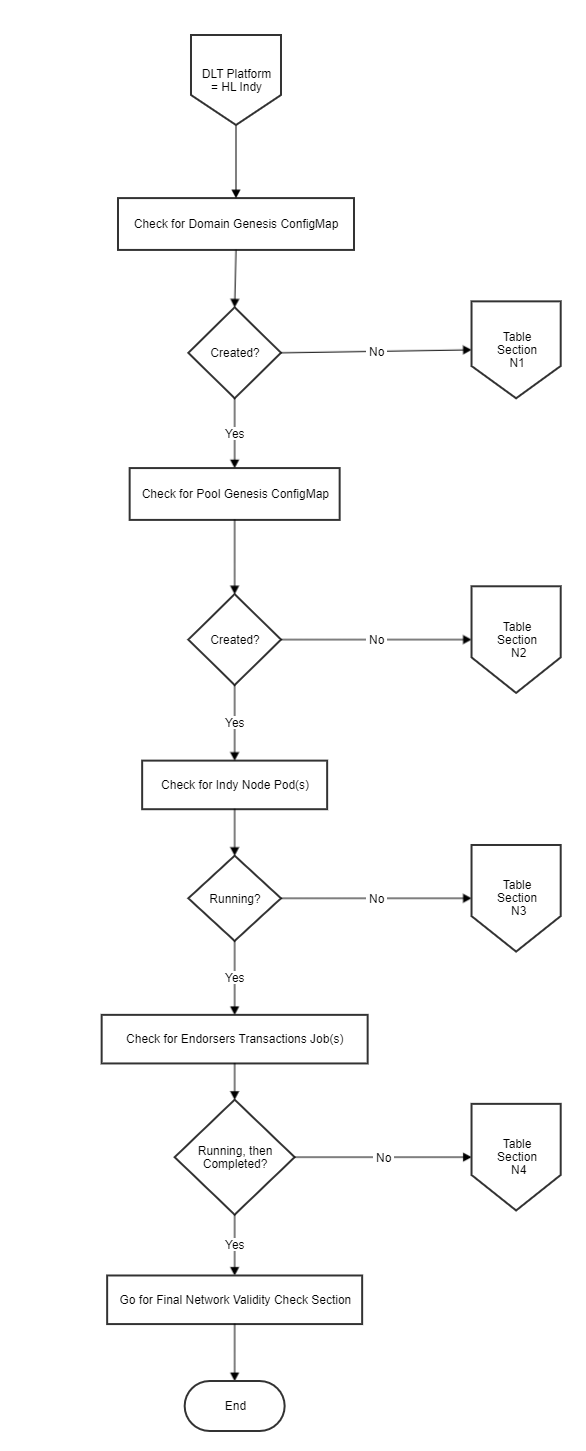
Indy Troubleshooting
Table ‘N’
| Section | Sub-Section | Problem | Possible Cause | Solution |
|---|---|---|---|---|
| N1 | a | Ansible playbook successful Playbook execution terminated at Role: setup/domain_genesis Task: Create domain genesis Error: Ansible vars or dict object not found, domain genesis was not created |
network.yaml not properly configured | Please check organisation.service.trustees, organisation.service.stewards and organisation.service.endorsers is properly configured for the failing organisation in your network.yaml.Please refer to indy_sample.yaml for more details. |
| N1 | b | Ansible playbook failed Playbook execution terminated at Role: setup/domain_genesis Task: Create domain genesis Error: Vault Access denied, Root Token invalid, Vault Sealed |
Vault connectivity | If the logs mention "access denied", make sure that the Vault authentications were created correctly by checking all the tabs on Vault UI. Any Vault authentication problem is because of running different configurations (network.yaml) on the same Vault. Please ensure that you reset the network before re-running with a different network.yaml. |
| N2 | a | Ansible playbook successful Playbook execution terminated at Role: setup/pool_genesis Task: Create pool genesis Error: Ansible vars or dict object not found, pool genesis was not created |
network.yaml not properly configured | Please check organisation.service.trustees, organisation.service.stewards and organisation.service.endorsers is properly configured for the failing organisation in your network.yaml.Please refer to indy_sample.yaml for more details. |
| N2 | b | Ansible playbook failed Playbook execution terminated at Role: setup/pool_genesis Task: Create pool genesis Error: Vault Access denied, Root Token invalid, Vault Sealed |
Vault connectivity | If the logs mention "access denied", make sure that the Vault authentications were created correctly by checking all the tabs on Vault UI. Any Vault authentication problem is because of running different configurations (network.yaml) on the same Vault. Please ensure that you reset the network before re-running with a different network.yaml. |
| N3 | a | Ansible playbook successful Playbook execution terminated at Role: setup/node Task: Wait until steward pods are running Error: logs of the nodes show that the nodes cannot connect with each other |
Port/IP blocked from firewall | You can check the logs of node pods using: $> kubectl logs -f -n university university-university-steward-1-node-0 Properly configure the required outbound and inbound rules for the firewall settings for Ambassador Pod.E.g. if you using AWS the firewall setting for the Ambassador Pod will be K8S Cluster's worker-sg Security Group. |
| N3 | b | Ansible playbook successful Playbook execution terminated at Role: setup/node Task: Wait until steward pods are running Error: Not able to connect to the indy pool |
Ambassador IP does not match the PublicIps provided in network.yaml | Check the Ambassador Host's IP using $> host <Ambassador Public URL> and verify if the same is present in the PublicIps: section of your network.yaml |
| N3 | c | Ansible playbook successful Playbook execution terminated at Role: setup/node Task: Wait until steward pods are running Error: Not able to connect to the indy pool |
Port/IP blocked from firewall | Properly configure the required outbound and inbound rules for the firewall settings for Ambassador Pod.E.g. if you using AWS the firewall setting for the Ambassador Pod will be K8S Cluster's worker-sg Security Group. |
| N3 | d | Ansible playbook failed Playbook execution terminated at Role: setup/node Task: Wait until steward pods are running Error: Vault Access denied, Root Token invalid, Vault Sealed |
Vault connectivity | If the logs mention "access denied", make sure that the Vault authentications were created correctly by checking all the tabs on Vault UI. Any Vault authentication problem is because of running different configurations (network.yaml) on the same Vault. Please ensure that you reset the network before re-running with a different network.yaml. |
| N4 | a | Ansible playbook successful Playbook execution terminated at Role: setup/endorsers Task: Wait until identities are creating Error: not able to connect to indy pool |
Port/IP blocked from firewall | Properly configure the required outbound and inbound rules for the firewall settings for Ambassador Pod.E.g. if you using AWS the firewall setting for the Ambassador Pod will be K8S Cluster's worker-sg Security Group. |
| N4 | b | Ansible playbook successful Playbook execution terminated at Role: setup/endorsers Task: Wait until identities are creating Error: not able to connect to indy pool |
Ambassador IP does not match the PublicIps provided in network.yaml | Check the Ambassador Host's IP using $> host <Ambassador Public URL> and verify if the same is present in the PublicIps: section of your network.yaml |
| N4 | c | Ansible playbook failed Playbook execution terminated at Role: setup/endorsers Task: Wait until identities are creating Error: Vault Access denied, Root Token invalid, Vault Sealed |
Vault connectivity | If the logs mention "access denied", make sure that the Vault authentications were created correctly by checking all the tabs on Vault UI. Any Vault authentication problem is because of running different configurations (network.yaml) on the same Vault. Please ensure that you reset the network before re-running with a different network.yaml. |
Final network validy check
For final checking of the validity of the indy network.
Please find the generated pool genesis inside your releases/ReleaseName/OrgName/OrgName-ptg folder as pool_genesis.yaml.
NOTE: All the organisations will have the same pool genesis. Hence, you can pick from any organizationThe sample ConfigMap:
apiVersion: helm.fluxcd.io/v1
kind: HelmRelease
metadata:
  name: employer-ptg
  annotations:
    fluxcd.io/automated: "false"
  namespace: employer-ns
spec:
  releaseName: employer-ptg
  chart:
    path: platforms/hyperledger-indy/charts/indy-pool-genesis
    git: ssh://git@github.com/<username>/blockchain-automation-framework.git
    ref: master
  values:
    metadata:
      name: employer-ptg
      namespace: employer-ns
    organization:
      name: employer
    configmap:
      poolGenesis: |-
        {"reqSignature":{},"txn":{"data":{"data":{"alias":"university-steward-1","blskey":"3oYpr4xXDp1bgEKM6kJ8iaM66cpkHRe6vChvcEj52sFKforRkYbSq2G8ZF8dCSU4a8CdZWUJw6hJUYzY48zTKELYAgJrQyu7oAcmH1qQ5tqZc3ccp34wZaNFWEfWPt76cfd9BwGihzpMDRbQhMwLp68aasMXyYebn1MSbvkeg6UrmtM","blskey_pop":"RBS3XRtmErE6w1SEwHv69b7eSuHhnYh5tTs1A3NAjnAQwmk5SXeHUt3GNuSTB84L6MJskaziP8s7N6no34My4dizxkSbyuL7fWLEPTyxbAYZ3MGYzscZYWysXbSms2xFmYjT99n7uB78CgG8Chuo3iMuPJCAx6SBxTaAzTa7gAvtWB","client_ip":"127.0.0.1","client_port":15012,"node_ip":"127.0.0.1","node_port":15011,"services":["VALIDATOR"]},"dest":"Cj79w18ViZ7Q7gfb9iXPxYchHo4K4iVtL1oFjWbnrzBf"},"metadata":{"from":"NWpkXoWjzq9oQUTBiezzHi"},"type":"0"},"txnMetadata":{"seqNo":1,"txnId":"16bcef3d14020eac552e3f893b83f00847420a02cbfdc80517425023b75f124e"},"ver":"1"}
        {"reqSignature":{},"txn":{"data":{"data":{"alias":"university-steward-2","blskey":"4R1x9mGMVHu4vsWxiTgQEvQzPizyh2XspKH1KBr11WDNXt9dhbAVkSZBy2wgEzodjH9BcMzSjjVpHXQA3fJHgZJaGejH5DKzxyCm7XoEa8ff5rEnBfyGxMZRCtKio9GuovMBYmZkfA1XBexQcrZksPZc23NtnWJ9tWBonjWuzADiNKG","blskey_pop":"R14qoTS4urnSeNAMSgZzp2ryhi5kFLi1KCxK2ZP8Lk3Pa7FNFoqp6LrPanZxsdELVazsCEQv2B7fmexo3JGj3f2vtp2ZRzdaf9bAMReduFNZWe9vziQVYBA96maq82A7Ym2rSdK6hebJaix1ysv5LZy8jhNTYqjJoQ3fMEyRZ14EHM","client_ip":"127.0.0.1","client_port":15022,"node_ip":"127.0.0.1","node_port":15021,"services":["VALIDATOR"]},"dest":"ETdTNU6xrRwxuV4nPrXAecYsFGP6v8L5PpfGBnriC4Ao"},"metadata":{"from":"RhFtCjqTXAGbAhqJoVLrGe"},"type":"0"},"txnMetadata":{"seqNo":2,"txnId":"ab3146fcbe19c6525fc9c325771d6d6474f8ddec0f2da425774a1687a4afe949"},"ver":"1"}
        {"reqSignature":{},"txn":{"data":{"data":{"alias":"employer-steward-1","blskey":"2LieBpwUyP8gUVb16k7hGCUnZRNHdqazHVLbN2K2CgeE2cXt3ZC3yt8Gd8NheNHVdCU7cHcsEq5e1XKBS3LFXNQctiL6wMErxyXwcSWq8c9EtJwmqE7TESd5TaEYZhtrJ6TCDBdPU3BUFdw1q29g1omwYXRd6LZHmBsiWHYJbf4Mued","blskey_pop":"R9q58hsWHaVenRefuwh44fnhX8TcJMskiBX1Mf5ue7DEH8SGTajUcWVUbE3kT7mNeK2TeUMeXDcmboeSCkbpqtX2289ectbQAKj8pKWmkp7o5nkYjYwvqUsTaMutxXjSN6pvH9rLU13y86XkU1qDYoWvfJ6GT3qVetpEP26BGPv6Kq","client_ip":"127.0.0.1","client_port":15032,"node_ip":"127.0.0.1","node_port":15031,"services":["VALIDATOR"]},"dest":"C5F8eDsQZYQcUx1NPENenr9A1Jqr9ZCAXrcAoAcGkutY"},"metadata":{"from":"MKMbzGYtfpLk2NVhYSeSRN"},"type":"0"},"txnMetadata":{"seqNo":3,"txnId":"d85334ed1fb537b2ff8627b8cc4bcf2596d5da62c6d85244b80675ebae91fd07"},"ver":"1"}
        {"reqSignature":{},"txn":{"data":{"data":{"alias":"employer-steward-2","blskey":"36q2aZbJBp8Dpo16wzHqWGbsDs6zZvjxZwxxrD1hp1iJXyGBsbyfqMXVNZRokkNiD811naXrbqc8AfZET5sB5McQXni5as6eywqb9u1ECthYsemMq7knqZLGD4zRueLqhrAXLMVqdH4obiFFjjaEQQo9oAAzQKTfyimNWwHnwxp4yb3","blskey_pop":"QkYzAXabCzgbF3AZYzKQJE4sC5BpAFx1t32T9MWyxf7r1YkX2nMEZToAd5kmKcwhzbQZViu6CdkHTWrWMKjUHyVgdkta1QqQXQVMsSN7JPMSBwFSTc9qKpxC9xRabZHEmha5sD8nsEqwDCQ5iQ2dfuufGoPTEnrdNodW1m9CMRHsju","client_ip":"127.0.0.1","client_port":15042,"node_ip":"127.0.0.1","node_port":15041,"services":["VALIDATOR"]},"dest":"D2m1rwJHDo17nnCUSNvd7m1qRCiV6qCvEXxgGfuxtKZh"},"metadata":{"from":"P5DH5NEGC3agMBssdEMJxv"},"type":"0"},"txnMetadata":{"seqNo":4,"txnId":"1b0dca5cd6ffe526ab65f1704b34ec24096b75f79d4c0468a625229ed686f42a"},"ver":"1"}
Copy the genesis block to a new file, say pool_genesis.txt
pool_genesis.txt >>

{"reqSignature":{},"txn":{"data":{"data":{"alias":"university-steward-1","blskey":"3oYpr4xXDp1bgEKM6kJ8iaM66cpkHRe6vChvcEj52sFKforRkYbSq2G8ZF8dCSU4a8CdZWUJw6hJUYzY48zTKELYAgJrQyu7oAcmH1qQ5tqZc3ccp34wZaNFWEfWPt76cfd9BwGihzpMDRbQhMwLp68aasMXyYebn1MSbvkeg6UrmtM","blskey_pop":"RBS3XRtmErE6w1SEwHv69b7eSuHhnYh5tTs1A3NAjnAQwmk5SXeHUt3GNuSTB84L6MJskaziP8s7N6no34My4dizxkSbyuL7fWLEPTyxbAYZ3MGYzscZYWysXbSms2xFmYjT99n7uB78CgG8Chuo3iMuPJCAx6SBxTaAzTa7gAvtWB","client_ip":"127.0.0.1","client_port":15012,"node_ip":"127.0.0.1","node_port":15011,"services":["VALIDATOR"]},"dest":"Cj79w18ViZ7Q7gfb9iXPxYchHo4K4iVtL1oFjWbnrzBf"},"metadata":{"from":"NWpkXoWjzq9oQUTBiezzHi"},"type":"0"},"txnMetadata":{"seqNo":1,"txnId":"16bcef3d14020eac552e3f893b83f00847420a02cbfdc80517425023b75f124e"},"ver":"1"}
{"reqSignature":{},"txn":{"data":{"data":{"alias":"university-steward-2","blskey":"4R1x9mGMVHu4vsWxiTgQEvQzPizyh2XspKH1KBr11WDNXt9dhbAVkSZBy2wgEzodjH9BcMzSjjVpHXQA3fJHgZJaGejH5DKzxyCm7XoEa8ff5rEnBfyGxMZRCtKio9GuovMBYmZkfA1XBexQcrZksPZc23NtnWJ9tWBonjWuzADiNKG","blskey_pop":"R14qoTS4urnSeNAMSgZzp2ryhi5kFLi1KCxK2ZP8Lk3Pa7FNFoqp6LrPanZxsdELVazsCEQv2B7fmexo3JGj3f2vtp2ZRzdaf9bAMReduFNZWe9vziQVYBA96maq82A7Ym2rSdK6hebJaix1ysv5LZy8jhNTYqjJoQ3fMEyRZ14EHM","client_ip":"127.0.0.1","client_port":15022,"node_ip":"127.0.0.1","node_port":15021,"services":["VALIDATOR"]},"dest":"ETdTNU6xrRwxuV4nPrXAecYsFGP6v8L5PpfGBnriC4Ao"},"metadata":{"from":"RhFtCjqTXAGbAhqJoVLrGe"},"type":"0"},"txnMetadata":{"seqNo":2,"txnId":"ab3146fcbe19c6525fc9c325771d6d6474f8ddec0f2da425774a1687a4afe949"},"ver":"1"}
{"reqSignature":{},"txn":{"data":{"data":{"alias":"employer-steward-1","blskey":"2LieBpwUyP8gUVb16k7hGCUnZRNHdqazHVLbN2K2CgeE2cXt3ZC3yt8Gd8NheNHVdCU7cHcsEq5e1XKBS3LFXNQctiL6wMErxyXwcSWq8c9EtJwmqE7TESd5TaEYZhtrJ6TCDBdPU3BUFdw1q29g1omwYXRd6LZHmBsiWHYJbf4Mued","blskey_pop":"R9q58hsWHaVenRefuwh44fnhX8TcJMskiBX1Mf5ue7DEH8SGTajUcWVUbE3kT7mNeK2TeUMeXDcmboeSCkbpqtX2289ectbQAKj8pKWmkp7o5nkYjYwvqUsTaMutxXjSN6pvH9rLU13y86XkU1qDYoWvfJ6GT3qVetpEP26BGPv6Kq","client_ip":"127.0.0.1","client_port":15032,"node_ip":"127.0.0.1","node_port":15031,"services":["VALIDATOR"]},"dest":"C5F8eDsQZYQcUx1NPENenr9A1Jqr9ZCAXrcAoAcGkutY"},"metadata":{"from":"MKMbzGYtfpLk2NVhYSeSRN"},"type":"0"},"txnMetadata":{"seqNo":3,"txnId":"d85334ed1fb537b2ff8627b8cc4bcf2596d5da62c6d85244b80675ebae91fd07"},"ver":"1"}
{"reqSignature":{},"txn":{"data":{"data":{"alias":"employer-steward-2","blskey":"36q2aZbJBp8Dpo16wzHqWGbsDs6zZvjxZwxxrD1hp1iJXyGBsbyfqMXVNZRokkNiD811naXrbqc8AfZET5sB5McQXni5as6eywqb9u1ECthYsemMq7knqZLGD4zRueLqhrAXLMVqdH4obiFFjjaEQQo9oAAzQKTfyimNWwHnwxp4yb3","blskey_pop":"QkYzAXabCzgbF3AZYzKQJE4sC5BpAFx1t32T9MWyxf7r1YkX2nMEZToAd5kmKcwhzbQZViu6CdkHTWrWMKjUHyVgdkta1QqQXQVMsSN7JPMSBwFSTc9qKpxC9xRabZHEmha5sD8nsEqwDCQ5iQ2dfuufGoPTEnrdNodW1m9CMRHsju","client_ip":"127.0.0.1","client_port":15042,"node_ip":"127.0.0.1","node_port":15041,"services":["VALIDATOR"]},"dest":"D2m1rwJHDo17nnCUSNvd7m1qRCiV6qCvEXxgGfuxtKZh"},"metadata":{"from":"P5DH5NEGC3agMBssdEMJxv"},"type":"0"},"txnMetadata":{"seqNo":4,"txnId":"1b0dca5cd6ffe526ab65f1704b34ec24096b75f79d4c0468a625229ed686f42a"},"ver":"1"}
Install indy-cli, in case not installed already, follow the official installation steps.
Open the indy-cli terminal
~$ indy-cli
Create a pool
indy> pool create <POOL_ALIAS> gen_txn_file=<Path to pool_genesis.txt>
Connect to indy pool
indy> pool connect <POOL_ALIAS>
Upon successful connection, should display a Pool Connected Successfully msg.